The decomposer identified your bounded contexts. Now comes the question every modernization team argues about: Lambda or ECS? Aurora or DynamoDB? API Gateway REST or HTTP?
We've all been in that meeting. Someone champions serverless. Someone else insists on containers. Nobody has data, so the loudest voice wins.
The solution architect agent takes the opinion out of it. It reads the discovery and decomposition reports, references an AWS service mapping guide, and produces a target architecture grounded in what the code actually does. Every recommendation includes the CDK construct you'd use to build it.
Serverless-first, containers when necessary
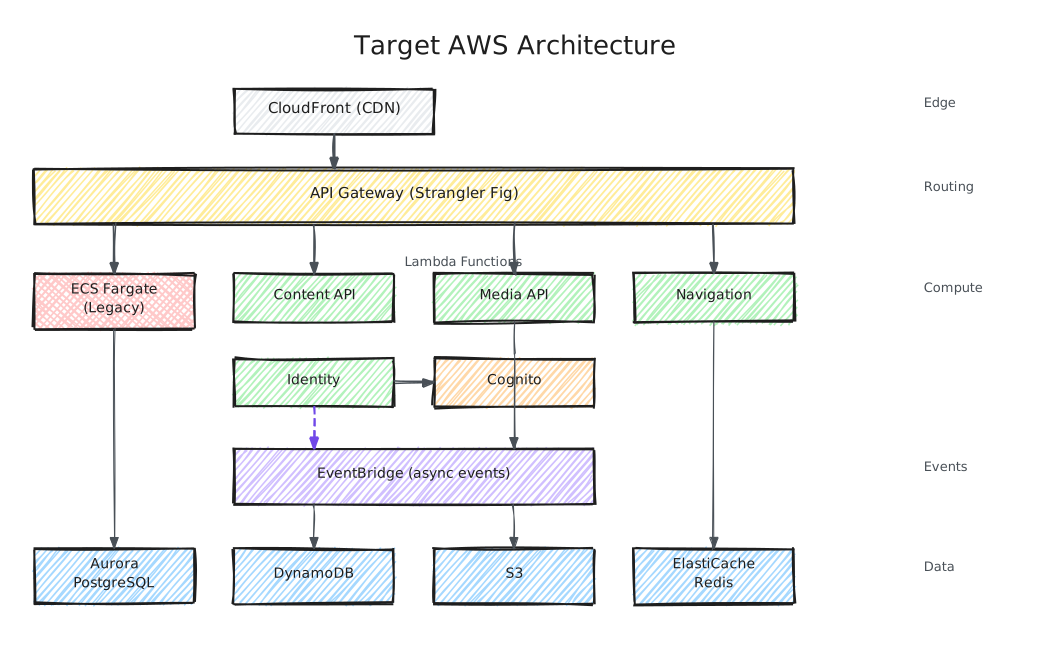
The agent defaults to Lambda unless there's a specific reason not to: long-running processes (> 15 min), complex runtime dependencies (full JVM, legacy framework), or stateful connections. For most modernizations, the pattern is hybrid: containerize the monolith on ECS Fargate as the Strangler Fig host, then extract services into Lambda.
In practice, this plays out differently for each application. Our ColdFusion CMS becomes a Lucee container on ECS Fargate, with content API, media processing, and navigation extracted as Lambda functions over time. The Java e-commerce platform's 312 pseudo-microservices consolidate into 8 ECS services with proper data ownership — a step backward before the step forward. The .NET portal migrates from IIS to Linux containers on ECS (replacing Windows-specific dependencies along the way), with reporting and workflow extracted to Lambda + Step Functions. The container isn't the end state — it's scaffolding for incremental extraction. Note that running both the legacy container and extracted services means managing dual deployment pipelines during the transition period — the CI/CD design (below) accounts for this.

Cloud design patterns applied
The architect applies specific patterns to each service boundary:
- Strangler Fig — API Gateway routes to legacy (ALB → container) or new services (Lambda). The migration strategy itself.
- CQRS — Separate read/write models when access patterns differ significantly. One approach: Aurora for writes, DynamoDB + ElastiCache for reads, synced via EventBridge. The specific technology choices depend on query complexity and consistency requirements.
- Transactional Outbox — Replaces distributed transactions. The service writes domain events to an outbox table in the same database transaction as the business data. A separate process reads from the outbox table via DynamoDB Streams, Aurora CDC, or an SQS-backed poller and publishes events to EventBridge. EventBridge Pipes can connect these stream/queue sources to targets with optional filtering and enrichment. This guarantees at-least-once event delivery without XA/2PC.
- Circuit Breaker — During Strangler Fig transition, if a new service fails, fall back to legacy code path. Makes migration reversible.
- Hexagonal Architecture — All new services isolate domain logic from AWS SDK. Testable without infrastructure.
- Anti-Corruption Layer — Lambda adapters translate between legacy formats and new service APIs during coexistence.
Data architecture by access pattern
Each data store gets a target based on its actual access patterns — not a blanket "move everything to Aurora." The tradeoffs matter:
| Legacy Pattern | Target | Why | Tradeoff |
|---|---|---|---|
| Relational DB (MSSQL, Oracle, MySQL) | Aurora PostgreSQL | Managed, multi-AZ, DMS-compatible | Aurora with good indexing is often more cost-effective than DynamoDB for mixed workloads — the TPS threshold varies by query complexity and consistency requirements |
| Custom ORM with runtime schema | Aurora with explicit DDL | Flatten inheritance, generate from metadata | Schema migration complexity scales with entity count |
| In-process cache | ElastiCache Redis | Enables horizontal scaling | Adds ~1ms network hop; evaluate whether hit rate justifies cost |
| Session storage (in-memory) | ElastiCache Redis + JWT | Eliminates sticky sessions | JWT token size affects request overhead; keep claims minimal |
| High-read lookup tables | DynamoDB | Single-digit ms reads, scales independently | Only cost-effective for key-value access; complex queries still need Aurora |
| File storage (local, NFS) | S3 + CloudFront | Eliminates shared filesystem | CloudFront invalidation adds complexity for frequently-updated assets |
| User credentials | Cognito User Pool | Managed auth with MFA, migration triggers | Cognito is limited to 50 custom user attributes and basic SAML configuration; evaluate Auth0/Okta for complex identity requirements |
The agent makes specific calls based on evidence. If the discovery found a URL routing table with thousands of cached entries read on every request, that goes to DynamoDB. If it found a user directory with bcrypt password hashes, it designs a Cognito migration Lambda trigger. On first sign-in after migration, the trigger authenticates against the legacy user table and creates the user in Cognito if successful — the user never knows the migration happened.
A note on tradeoffs: DynamoDB isn't always the right answer for high-read data. If the read patterns involve complex joins or ad-hoc queries, Aurora with proper indexing may be more cost-effective and operationally simpler. The agent considers query complexity, not just read volume, when making data store recommendations. Similarly, ElastiCache adds operational overhead (cluster management, failover configuration) that may not be justified for applications with modest traffic — Aurora's built-in buffer pool cache may be sufficient. Sometimes the simplest cache is no cache.
Selective MCP queries
The agent queries live AWS documentation through MCP tools, but selectively. Always query for architecturally complex services (VPC Lattice, EventBridge Pipes, Cognito migration triggers). Skip stable, well-documented services (Lambda, S3, DynamoDB, SQS). This keeps analysis fast — 3-5 MCP queries instead of 15+.
When MCP is unavailable, the agent falls back to training knowledge and labels the output accordingly. Every agent supports a --fast flag that skips all MCP calls entirely — essential for iterative work and when external services are down.
Network, multi-account, and CI/CD
Every architecture gets a 3-tier VPC: public (load balancers only), private (compute), and isolated (databases), with per-service security groups and VPC endpoints for AWS service calls. Account structure follows Control Tower conventions — Management, Shared Services, Dev, Staging, Prod, and Security/Audit.
The agent also designs CI/CD — many legacy codebases have inadequate, undocumented, or entirely manual deployment processes. Even those with Jenkins or TeamCity often lack automated quality gates. Source → Build (lint, security scan, tests, container build) → Staging → Integration Tests → Approval → Production.
For production deployments, the strategy is service-specific: ECS services get Blue/Green via CodeDeploy (automatic rollback if error rate exceeds a defined threshold during the bake period). Lambda functions get canary deployments (a small percentage of traffic routed to the new version first, with automatic rollback if error rates spike). The specific thresholds — error rate percentage, bake duration, traffic split — are defined per service based on its criticality and traffic patterns.
Quality gates include infrastructure validation (cfn-lint, cdk-nag), contract tests (Pact), container vulnerability scanning (Inspector), and post-deploy synthetic monitoring (CloudWatch Synthetics).
Every decision traces to codebase evidence. If you're reviewing the report and disagree with a recommendation, you can see exactly why it was made — and what would change if the evidence were different. That's the advantage of evidence-based architecture: disagreements become conversations about data, not opinions.
Next: Part 4 — Security Is Not a Phase — where the security architect audits legacy code for vulnerabilities and designs defense-in-depth for the cloud target. It runs in parallel with this agent, so security findings directly shape the architecture.