Architecture diagrams don't get budget approval. Numbers do.
If you've ever tried to get a modernization funded, you know the conversation. "How much will it cost?" "What do we save?" "When do we break even?" Hand-wave those answers and the project dies in committee.
The cost analyzer agent has a different job than the other agents. It's not designing systems — it's building the financial case. It queries the AWS Price List API for real, current pricing data and produces a cost model that finance teams can evaluate.
Three tiers, not one estimate
Nobody believes a single cost number. The agent models three traffic scenarios — low, medium, high — each specifying exact configurations: ECS task count and size, Lambda request volume, database instance class, cache node type, API Gateway requests, CloudFront transfer.
Every line item uses real unit prices from the AWS Price List API, queried on the day of analysis and baselined to a specific region (typically us-east-1 — the agent notes the region explicitly, since pricing varies by region). A typical modernization cost model:
| Service | Low | Medium | High |
|---|---|---|---|
| ECS Fargate (container hosting) | $70–80 | $280–300 | $550–600 |
| Lambda (serverless functions) | $4–5 | $20–25 | $80–90 |
| Aurora PostgreSQL (database) | $55–65 | $200–225 | $450–475 |
| ElastiCache Redis (caching) | $10–15 | $155–165 | $630–650 |
| API Gateway (routing) | $5 | $25 | $100 |
| CloudFront (CDN) | $8–10 | $40–45 | $170–180 |
| S3 + SQS + NAT + Secrets Manager | $40–50 | $60–75 | $130–150 |
| Total | $190–230 | $780–860 | $2,000–2,250 |
All costs USD/month, us-east-1, on-demand pricing unless noted. Actual costs vary by region, usage patterns, and commitment discounts.
The range depends on the specific architecture. Our ColdFusion CMS, with heavy media processing, spends most on S3 and CloudFront. The Java e-commerce platform's cost is dominated by Aurora (complex queries, high write volume) and ECS compute (8 consolidated services). The .NET portal's biggest win was eliminating Windows Server and SQL Server licensing — the platform itself was the cost driver, not the workload.

The licensing story
This is where the business case gets compelling. Legacy applications often carry significant commercial license costs that disappear after modernization:
| License | Typical Annual Cost | Post-Migration |
|---|---|---|
| Commercial app server (WebSphere, WebLogic) | $15,000–$50,000+ per CPU | $0 (open-source on ECS) |
| Commercial database (Oracle, SQL Server) | $4,000–$50,000+ per core | $0 (Aurora PostgreSQL) |
| Commercial runtime (Adobe ColdFusion) | Varies by edition and subscription model | $0 (open-source alternative) |
| Java runtime (Oracle JDK) | Oracle Java SE now requires paid subscriptions for production use (pricing varies by processor/employee count) | $0 (Amazon Corretto — free, drop-in replacement) |
Licensing models change frequently — Oracle overhauled JDK licensing in 2023, and Adobe ColdFusion has shifted toward subscription pricing. The agent flags the presence of commercial runtimes and databases as a cost investigation item; the exact savings depend on your current contract terms. But the direction is always the same: commercial licenses go to zero when you move to open-source alternatives on AWS.
The agent identifies licensing risks from the discovery report. Oracle-specific SQL → Oracle license cost. ColdFusion engine detection → CF license. Oracle JDK references → recommend Corretto.
The TCO comparison
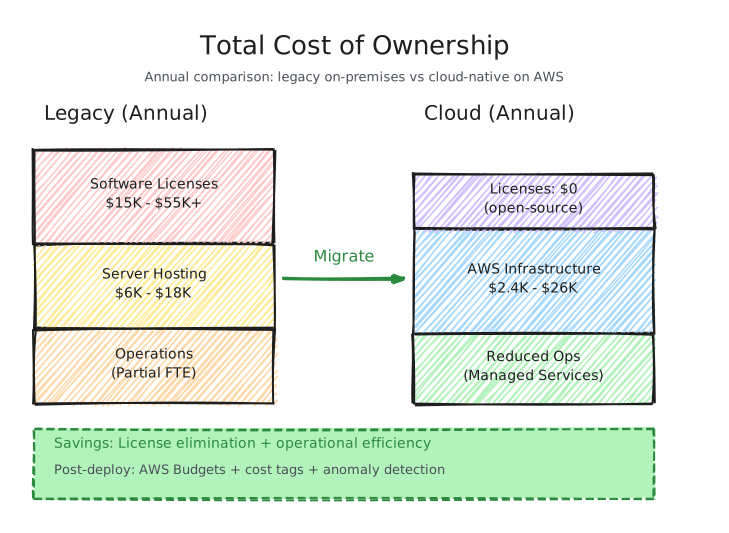
The full TCO model compares current state to cloud state:
| Category | Current (Annual) | Cloud (Annual) |
|---|---|---|
| Software licenses | $15K–$55K+ | $0 |
| Server hardware / hosting | $6K–$18K | $0 |
| AWS infrastructure | $0 | $2.4K–$26K (depends on tier) |
| Operations / maintenance | Partial FTE | Reduced toil |
Break-even depends on license savings. Applications with expensive commercial licenses can break even quickly. Open-source stacks take longer because savings come primarily from operational efficiency.
These cost models validate the architectural choices from the target design (Part 3). Serverless-first reduces baseline costs, Aurora over Oracle eliminates licensing, and ElastiCache justifies its cost only when cache hit rates are high enough to offset the database load reduction.
Top cost drivers and optimizations
The agent identifies the top 3 cost drivers and provides specific optimization paths:
Compute (ECS Fargate) — typically 30–40% of the bill. Fargate Spot for non-production (up to 70% discount), ARM/Graviton tasks (~20% savings), scale-to-zero during off-hours.
Database (Aurora) — typically 25–30%. Aurora Serverless v2 for dev/staging (scales to 0.5 ACU), Reserved Instances for production (~35% discount).
Cache (ElastiCache) — typically 15–25%. ElastiCache Serverless for variable workloads, TTL tuning to reduce memory requirements.
NAT Gateway — a hidden cost driver. VPC endpoints for S3 and DynamoDB (free gateway endpoints) eliminate most NAT data processing charges.
The MCP pricing integration
The cost agent uses the awspricing MCP tool to pull real-time pricing from the AWS Price List API. Every number is traceable to a specific API query on a specific date. When MCP is unavailable, the agent falls back to training knowledge and labels estimates accordingly.
Savings Plans
After sufficient production data (typically 1-3 months), the agent recommends Compute Savings Plans. The conservative starting point is 1-Year No Upfront (typically 12-17% discount depending on the compute family), with 3-Year options (up to ~34% discount) once usage patterns are stable. Exact discount percentages vary by instance family and commitment level — the agent pulls current rates from the pricing API rather than using static estimates. The agent recommends Compute Savings Plans over Reserved Instances as the starting point because they're flexible across instance families, sizes, and regions — useful during migration when workload shapes are still evolving. Reserved Instances can offer slightly deeper discounts for stable, well-understood workloads after the migration stabilizes.
Post-deployment cost governance
The cost model doesn't end at deployment. The agent recommends setting up ongoing cost governance from day one:
- AWS Budgets — monthly budget alerts at 80% and 100% of projected spend, per-service breakdown
- Cost allocation tags — every resource tagged with
service,environment, andcost-centerfor chargeback and anomaly detection - Cost Anomaly Detection — CloudWatch anomaly alerts for unexpected spend spikes, particularly during the migration transition when usage patterns are unpredictable
The slide that matters
If you had to summarize the financial case:
- Current state: $X/year in licenses + hosting + operations
- Target state: $Y/year in AWS infrastructure + reduced operations
- Annual savings: license elimination + operational efficiency
- Intangibles: scalability, reliability, security posture, developer velocity
The cost model is the output non-technical stakeholders care about most. It's also the one that needs to be most defensible. Every number traces to a specific source.
The numbers tell the story. Make them defensible.
Next: Part 7 — The Handoff — where the migration strategist synthesizes everything into a PRD, user stories, and implementation prompts ready for agentic coding assistants to begin the actual transformation. The cost models here become a key input for PRD prioritization — the highest-ROI extractions move up in the wave plan.